Comparisons
Vyxora vs Otter: Which AI Note Taker Should You Choose?
Compare Otter and Vyxora for live transcripts, recording imports, lecture notes, project questions, sources, and limits that affect your monthly use.
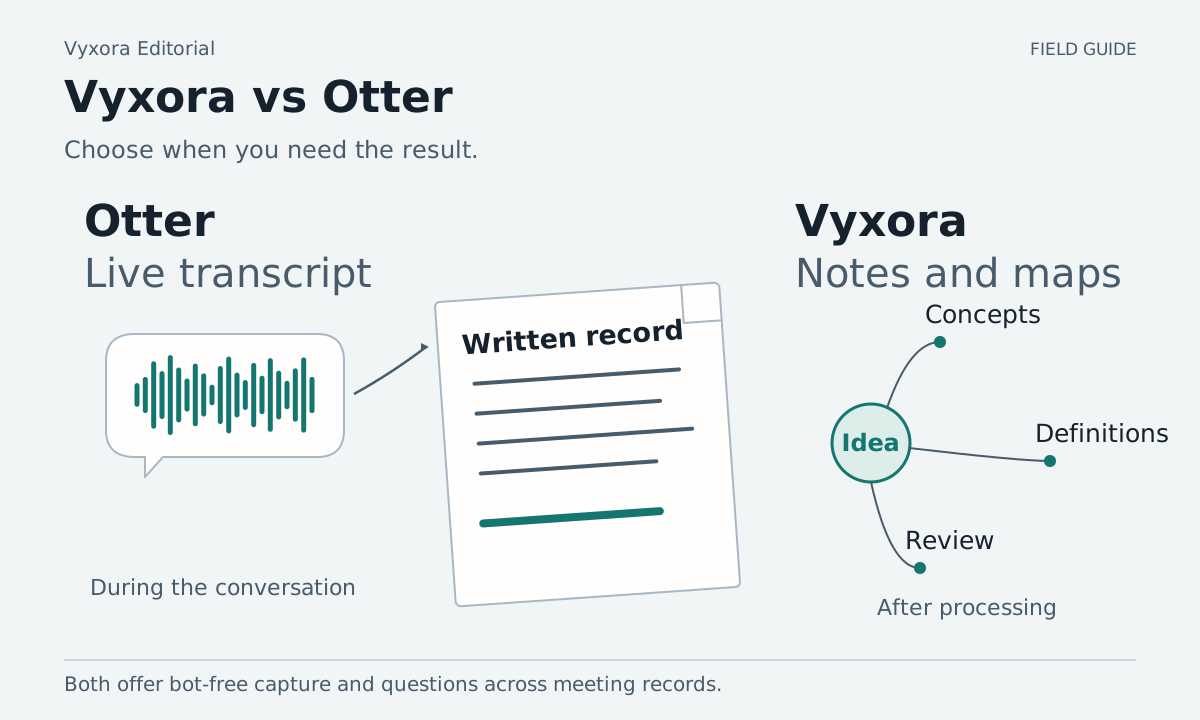
If you need to follow the words while a conversation happens, start by looking at Otter's live transcription. If you want to turn saved recordings and documents into Notes, maps, and a project view you return to afterward, consider Vyxora. Decide when you need the result and what you want to do with it.
Both can answer questions across meeting records. Otter now documents botless capture in its Mac and Windows desktop apps. Compare the route you would use on your own device. Otter desktop capture, Otter AI Chat, Vyxora project questions
Choose between a live transcript and a result you review later
Otter lists live transcription, recording playback, and audio/video imports among its features. Its desktop documentation describes starting a recording and opening the live transcript while the recording continues. That is worth trying if you need to read along with a discussion. Otter features and limits, desktop recording
Vyxora Capture records audio, then lets you choose General, Meeting, or Study and create a Note. Processing happens after capture. Completed Notes organize the material with a summary, map, relevant tasks or study review points, and questions you can check against the source. Do not choose Vyxora as a live-captioning tool. Vyxora Capture, Note modes
Reading along during a workshop and making a review checklist afterward are separate jobs. If you need both, test both jobs and inspect the transcript and study material separately.
Bot-free recording is available in both
Otter's desktop-app page, updated October 1, 2026, describes botless recording for supported meetings on Mac and Windows. It explains the audio permissions needed, including for recording while wearing headphones. Otter also has a notetaker route that can join meetings. Check which method your device and meeting setup support. Otter desktop capture
Vyxora Capture uses a browser extension to record microphone, tab, or available computer audio. It does not join the call as a participant, and its computer-audio option keeps audio only. Browser and operating-system support affect the available sources. Vyxora Capture
Choose a source you can test before the real session. Check that both your voice and the other participants are audible when needed. Get permission to record. Keeping a bot out of the participant list does not remove that responsibility.
Compare questions, documents, and study outputs
| Requirement | Otter | Vyxora |
|---|---|---|
| Read during a conversation | Live transcription | Notes are available after processing |
| Use a recording you already have | Audio/video imports, with plan limits | Supported audio uploads or pasted transcripts |
| Ask across previous material | AI Chat across conversations, channels, and folders | Ask completed Notes, selected Notes, or Workstream Notes |
| Check what an answer used | AI Chat shows source context | Open supporting Note passages beside answers |
| Review course or project material | Test the available templates and chat on your plan | Study Notes for concepts and review; Workstreams for related Notes and changes |
Otter's AI Chat documentation covers cross-conversation context and sources. Its pricing page describes templates and input limits. Vyxora's Notes and Workstreams show how to review notes, maps, and supporting passages.
Otter's newest Chat and Work experience is rolling out, and the documentation says web/desktop and mobile can differ during the transition. Connected-app capabilities also vary. Confirm what your account has before planning around a release announcement. We are not treating every announced connector or new chat experience as universally available. Otter rollout and platform details
Vyxora can read embedded text in documents such as PDF, DOCX, and PPTX. It does not run OCR; scanned pages need conversion, and images in slides should not be assumed to become searchable descriptions. Its mobile product is coming soon. Vyxora inputs and availability, document limits
Try a workshop with a corrected explanation
This fictional workshop gives you something precise to check. Use it as short practice material you are allowed to record, or replace it with your own equivalent:
- The instructor introduces a process with three stages: collect, review, and release.
- An early example says a draft can go straight from collect to release.
- The instructor corrects that example: review is required before release.
- A text-based worksheet still says “collect → release,” omitting review.
- The next session adds a second reviewer for sensitive material.
During the recording, test whether Otter's live transcript helps you follow the correction. Afterward, ask both tools: “What review is required before release, and which part of the worksheet needs correcting?”
Use the supported routes for the worksheet and later session in each product. If a required input cannot be added through the route or plan you are trying, record that limit. Do not quietly paste the missing answer into the question and count it as successful retrieval.
Check whether the answer treats the instructor's correction as newer than the first example and whether it finds the later second-reviewer requirement. Open the sources. The worksheet's older written sequence should remain identifiable as a disagreement, not be silently rewritten into evidence of the corrected rule.
Then ask for five questions to review before the next session. Inspect whether they cover the actual process and correction, rather than generic questions about the subject. This is a way to compare usable outputs; it does not establish learning gains or prove transcription accuracy.
If Vyxora's Study structure fits the material, create the workshop Notes in Study mode and group the related completed Notes in a Workstream. Test whether the concepts, map, and sources help you review the correction. Study Notes, related Note review
Check imports and history before comparing prices
Otter's Basic plan lists 300 monthly transcription minutes, a 30-minute conversation limit, and three lifetime audio/video file imports. Pro lists 1,200 minutes and ten monthly imports. An hour-long session or an archive of uploaded recordings needs a different trial than one short live meeting. Otter plan limits
The standard Pro price is $16.99 per user per month, or $8.33 per month on annual billing. Its pricing page also displays promotional rates with eligibility conditions. Keep those offers separate from the regular subscription rate, and check the total charged for an annual plan. Otter pricing and offer footnotes
Vyxora's regular monthly rates are Free at $0, Plus at $11.99, and Pro at $24.99. Annual Plus costs $119; annual Pro costs $249. A current monthly Plus offer includes a 90-day trial, which does not apply to annual billing. Compare the recurring cost after an offer ends. Vyxora pricing
Vyxora Free includes 180 audio minutes, ten Note creations or refreshes, and 20 assistant answers per month. It also limits kept recordings to three, with playback lasting 30 days. Importing a course archive, regenerating Notes, and asking repeated questions all affect which plan fits. Vyxora allowances
Check whether the plan keeps enough accessible history for your course or project. Also try exporting a result you would need to keep outside the app before importing everything you own.
When Otter is the better choice
Choose Otter if following a live transcript, its released mobile apps, or its available conversation-sharing features are requirements. Test that exact workflow and platform; check that the feature works in the mobile app you intend to use. Otter plans, AI Chat platform scope
Vyxora is worth trying when you want processed Notes shaped for General, Meeting, or Study, visual maps, and questions about changes across saved project material. Its processing needs an online account. It does not provide live captions, screen-video capture, or OCR, and its mobile app is not yet a released option. Vyxora Notes, Capture, mobile availability
Choose one ordinary session as your trial, then return to it a few days later with a question you did not prepare in advance. Check the answer against its sources and the plan limits against your next month of work.