
Comparisons
Vyxora vs Granola: Which AI Note Taker Should You Choose?
Compare Granola and Vyxora for notes you shape during a call, imported recordings and documents, project questions, source checks, and pricing.
If you like typing a few points during a call and letting the transcript fill in the gaps, start by looking at Granola. If you want to bring recordings, documents, and lecture material into Notes, then follow a project through related Notes and their source passages, put Vyxora on your shortlist.
Both offer bot-free capture and questions across meetings. Your choice needs to account for how you take notes, what you want to keep, and how you use the result a week later. Granola features, Vyxora capture, Vyxora project questions
Choose around the way you take notes
Granola uses your typed notes alongside the meeting transcript to generate enhanced notes. You can edit those notes, change their template, and inspect the supporting transcript or raw note. It suits a person who wants their own selections to help shape the written record. Granola's enhanced-note documentation
Vyxora starts with material you choose to add: captured audio, an uploaded recording, a pasted transcript, or a text-based document. You choose General, Meeting, or Study. Meeting mode organizes decisions and follow-ups; Study mode organizes concepts, definitions, and a review checklist. A completed Note includes a visual map and lets you ask questions with the source passages nearby. Vyxora Notes
Try Vyxora if one week includes a project call, a recorded interview, and a lecture or briefing document. Try Granola if your main habit is attending calls with a notepad open and deciding what deserves emphasis as people speak.
Compare the inputs and what survives the meeting
| Check | Granola | Vyxora |
|---|---|---|
| Capture without a meeting bot | Device-audio capture through its apps | Microphone, tab, or available computer audio through Vyxora Capture |
| Shape the notes | Typed notes help shape enhanced notes; templates can be changed | General, Meeting, and Study shape Notes around the input |
| Keep the recording | Its pricing page says audio is deleted after transcription | Capture offers a keep-audio choice; retained recordings depend on plan limits |
| Ask across meetings | Chat across meetings and folders | Ask completed Notes or related Notes in a Workstream |
| Add document context | Chat supports file attachments; unavailable on iOS | Create Notes from supported text documents or attach supporting sources |
Granola's capture, audio-retention, and plan details are listed in its current plan comparison. Its chat documentation explains folders and attachments. Vyxora's Capture page describes recording and retention; its Workstreams page describes related Notes and sources.
Deleting audio can suit someone who wants a written record without keeping the original sound. Keeping audio can suit someone who needs to listen again. Decide that before the trial: a transcript cannot reproduce tone or recover a word that transcription missed.
Vyxora Capture records audio only. Its computer-audio option does not save screen video, and available audio sources depend on your browser and operating system. Vyxora also needs an online account for processing and saved Notes. Its mobile product is coming soon, so do not choose it on the assumption that a released native phone app is included. Capture limits, current product availability
Test one question that needs two meetings
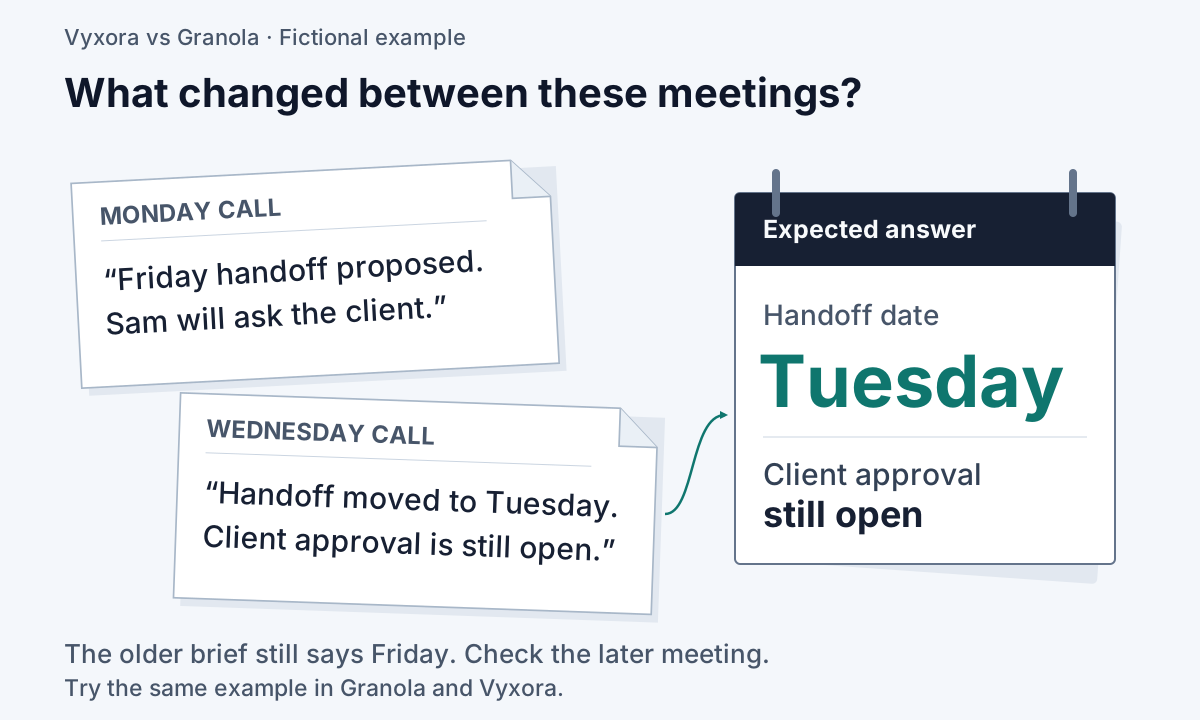
Use a short project with a correction in it. This fictional material gives you a clear answer to check:
| Source | What it says |
|---|---|
| Monday call | The team proposes a Friday handoff. Sam will ask the client to confirm the scope. |
| Wednesday call | The client has not confirmed. The team moves the handoff to Tuesday. Sam still owns the scope question. |
| Project brief | The handoff requires client approval; the brief still shows Friday. |
Run your trial using material you are permitted to record or upload. If you are using a live-capture product, make the same short practice discussion available to both products. Add the brief using the document route each product supports.
Ask: “What is the current handoff date, what changed, and what is still waiting on Sam?”
Check the answer against the material above. Tuesday is the revised date. Client approval remains open. The brief's Friday date is older information, and the first call described a proposal. A useful answer should distinguish those states and let you find the evidence.
Then ask a follow-up: “Show me where the date changed.” Open the supporting material. Can you tell which meeting it came from? Can you read enough surrounding text to check the correction? Record what you could verify, where you had to search manually, and whether you needed to choose different meetings for the chat to search.
Granola already supports questions across meeting collections and file context. Vyxora lets you group related Notes in a Workstream to review decisions, open questions, and changes. The trial compares how each presents the result; it does not assume that one product alone can answer a project question. Granola chat, Vyxora Workstreams
Check history limits before comparing prices
Granola lists Basic at $0, Business at $14 per user per month, and Enterprise at $35 per user per month. Basic has 30 days of meeting history; the paid plans list unlimited history. A trial with last week's notes will not tell you whether the free tier covers questions about last quarter. Granola pricing
Vyxora's regular monthly rates are Free at $0, Plus at $11.99, and Pro at $24.99. Annual Plus is $119; annual Pro is $249. Its monthly Plus offer currently shows a 90-day trial; annual subscriptions do not include that trial. Review the terms alongside the allowances. Vyxora plans
The Vyxora Free plan includes 180 audio minutes, ten Note creations or refreshes, 20 assistant answers, and three Workstream builds per month. Compare that usage allowance with Granola's history window: creating a small set of Notes and querying an older archive are different needs. Retained Vyxora audio is playable for 30 days, so a keep-audio option should not be treated as permanent recording storage. Vyxora usage and retention limits
Keep your price comparison on the same billing basis. Include any paid tier needed for older history, document context, or your expected question volume. Also check how you will take your notes out of the product before moving an archive.
When Granola is the better choice
Choose Granola if its way of combining your own typed notes with the transcript matches how you work, and you want to keep that habit. Its shared folders and mobile apps may also decide the choice when colleagues or phone capture are requirements. Check the app and plan needed for your specific task. Granola notes, platforms and sharing
Vyxora is a reasonable fit when you want General, Meeting, or Study Notes from recordings, transcripts, and supported documents, visual maps, and an ongoing project view that keeps changes connected to source Notes. It reads embedded text in supported documents; scanned PDFs need text extraction first because Vyxora does not run OCR. It also does not replace a shared document editor. Vyxora Notes and document limits
Before choosing, repeat the trial with one of your own ordinary project questions. Keep the product that makes the answer easy to check and fits the way you will capture the next meeting.