
Meeting notes
How to Write a Project Update from Meeting Notes
Write a project update from weeks of meeting notes. Copy a short template for the current plan, progress, open decisions, and next steps.
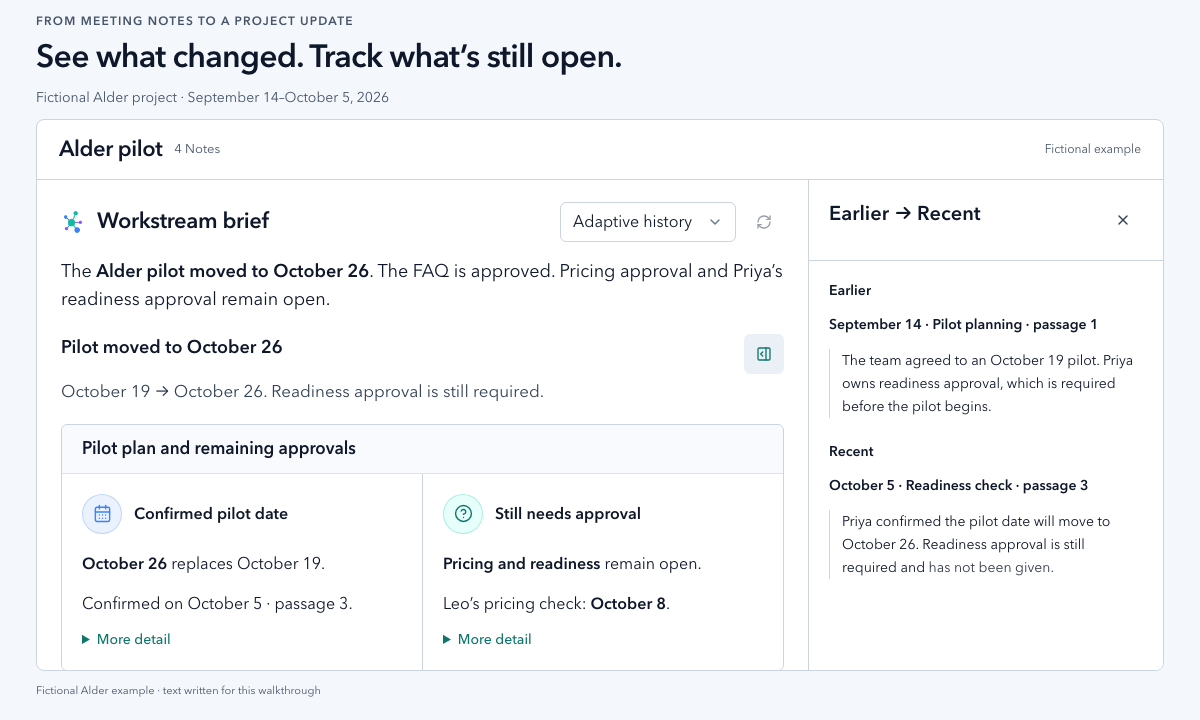
Open the notes from the period you need to report on. Write the current plan, explain the changes you can verify, and give unanswered questions a next step. Keep a note reference beside each point so the reader can check it.
Use the completed update and blank template below in an email, team chat, or status report. You do not need Vyxora to use them.
Start with the update you need to send
Alder is a fictional website pilot. Its four meetings, participants, source passages, and finished update are invented for this walkthrough. They are not customer records or captured AI answers. Maya, Leo, and Priya attend every session.
Suppose you are updating the team on October 5, 2026. This is the message you could send:
The dates and passage numbers refer to the source notes below. In a real update, add links to your notes or use recording timestamps so your team can check each point.
Copy a short project-update template
Select Copy text, then paste this template into an email, your team chat, or a status report. Replace each bracketed placeholder with your project's details and a source reference. Remove lines that do not apply. If the notes give no owner or date, write “not recorded” and ask the team to confirm them. For a proposed next step, write “proposed” as its source. If the source record is missing, write “not recorded.”
Keep “proposed” and “approval pending” in your message until you have a record confirming a decision. Check the earlier plan and later notes before reporting a change.
A project update usually needs progress, upcoming work, and risks, with links to detail. Asana's status-report guide provides one practical example of that format.
Gather dated notes and preserve the starting plan
Use meeting dates rather than upload order. Choose the period you are reporting on and keep an earlier note that establishes the plan. Include relevant corrections and decisions made outside meetings if you have them. Say when you do not.
For Alder, these four excerpts are the entire source set. There is no later message, approval log, or separate readiness checklist available. Each numbered item is a reference within that session.
September 14, 2026: Pilot planning
- Passage 1: “The team agreed to an October 19 pilot. Priya owns readiness approval, which is required before the pilot begins.”
- Passage 2: “Maya will prepare the page copy. Leo will send the finished drafts to Priya for approval.”
September 21, 2026: Copy check-in
- Passage 1: “FAQ copy has not reached Priya. The reason has not been established.”
- Passage 2: “Priya approved the help page copy today. That page has no open copy changes.”
September 28, 2026: Pilot review
- Passage 1: “Priya received the pricing copy on September 25. Approval is still pending.”
- Passage 2: “FAQ copy still awaits Leo's handoff to Priya.”
- Passage 3: “Leo proposed adding a paid test to the pilot. No approval was given.”
October 5, 2026: Readiness check
- Passage 1: “Leo clarified that the earlier FAQ delay was an unsent draft, not a rejected review. Priya has now received and approved the FAQ copy.”
- Passage 2: “Pricing copy approval is still pending.”
- Passage 3: “Priya confirmed the pilot date will move to October 26. Readiness approval is still required and has not been given.”
- Passage 4: “Leo will check with Priya on October 8 about pricing copy approval.”
The October 5 note changes the date and resolves the FAQ concern. It also preserves the earlier readiness requirement. A revised date alone does not authorize the pilot to begin.
Check an emerging concern against exceptions and corrections
The FAQ had not reached Priya on September 21. Pricing approval was still pending on September 28. Check where each piece of copy got stuck before blaming the approval step.
These notes show unfinished work on two pages, but do not establish a general pattern of approval delays. Repeating the FAQ gap on September 28 does not make it a separate delay, and the passages give no measure of how often delays occur.
Before writing “approval is holding up the project,” inspect the contrary evidence. The help page was approved on September 21. The October 5 clarification then explains that the FAQ draft had not been sent. Keep that correction next to the earlier concern so the update does not blame an approver for work they had not received. These notes do not establish that every page is delayed or that Priya caused the delays.
| Point in the update | Evidence to keep beside it | What it does not establish |
|---|---|---|
| Pilot date changed | September 14, passage 1 and October 5, passage 3 | Does not establish readiness approval |
| Copy handoff and approval need attention | September 21, passage 1 and September 28, passage 1 | An interpretation about these pages, not proof of a general trend |
| Some copy is approved | September 21, passage 2 and October 5, passage 1 | Does not establish pricing approval |
| Paid test was proposed | September 28, passage 3 | No approval recorded in the supplied notes |
| Pricing needs a follow-up | October 5, passages 2 and 4 | The notes do not say what Priya still needs to approve it |
MIT's meeting note-taking guidance recommends recording agreements so participants can confirm a shared understanding. If your notes leave approval ambiguous, ask the person responsible before presenting a proposal as a decision.
Follow the same evidence through a Workstream
In Vyxora Workstreams, group the completed Notes for the period you are reviewing. A Workstream build automatically prepares a saved brief in Review. Read it to see what changed and what still needs a decision, then check the observations you intend to use. Tasks and Needs attention items remain available alongside that reading.
Suggested angles let you examine another perspective in the same view. For Alder, you might choose an angle about copy or readiness if one is offered. Choosing an angle replaces the reading in that view. It does not create a second project brief or approve a change.
Select an observation to open its supporting Earlier and Recent passages. The evidence inspector sits beside the reading on desktop and opens beneath the observation on narrow screens. For the date change, check September 14, passage 1 against October 5, passage 3. For the copy concern, check both supporting meetings, then find the help-page exception and FAQ clarification in the Notes.
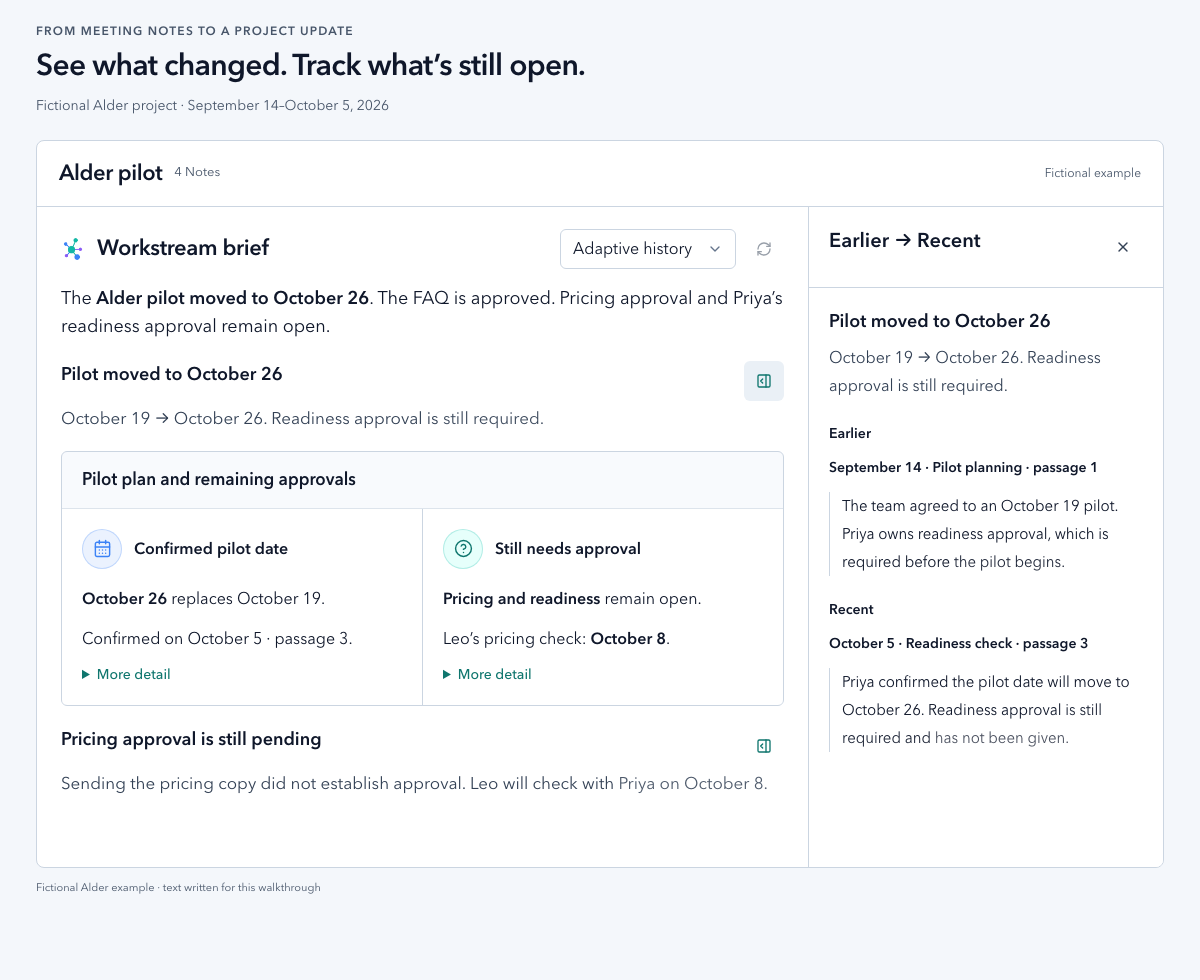
View the full-size brief and evidence.
A suggested question opens a read-only investigation in Review. Use it to examine what the supplied material can answer. The remaining Alder question is:
What do these notes establish about pricing copy approval, and what do we still need to ask Priya?
The October 5 passages establish that approval is pending and Leo has a next check. They do not explain what is preventing approval. Keep that missing answer in the update rather than supplying a likely reason.
Choose Dig deeper in Chat to continue the investigation's same conversation in the existing Chat display. A follow-up could ask:
Help me word that open question for the October 8 check. Keep proposed wording separate from what the meetings recorded.
Briefs and investigations are read-only analysis. They do not approve the pilot, edit verified project facts, alter Threads, or create or complete tasks.
Keep the update's date and coverage visible
When a Workstream build completes, the new brief appears automatically. Use the refresh control to request another analysis of the Overview or the angle you are reading. An open investigation keeps the context it started with, so check its source dates before using it in a newer update.
Check which Notes are included and which passages support each answer. Adding several Notes does not mean every passage is examined for every question. Generated readings can miss details or phrase them poorly. For a consequential claim, open the original passage and check later corrections before sending it.
Alder's example update is current through October 5 only. Reading it after October 8 does not establish that Leo completed the check or that pricing was approved. Add the later record when it is available, then revise the update.
Before sending your update, check that each decision has a passage, you have not stated a guess as a decision, and each open question has a next step. If that question needs a discussion, use it to prepare the next meeting from your previous notes.