
Meeting notes
How to Compare Meeting Notes and Find What Changed
Compare two dated meeting notes, check the passages behind changed plans, and keep proposals and missing answers out of the confirmed decisions.
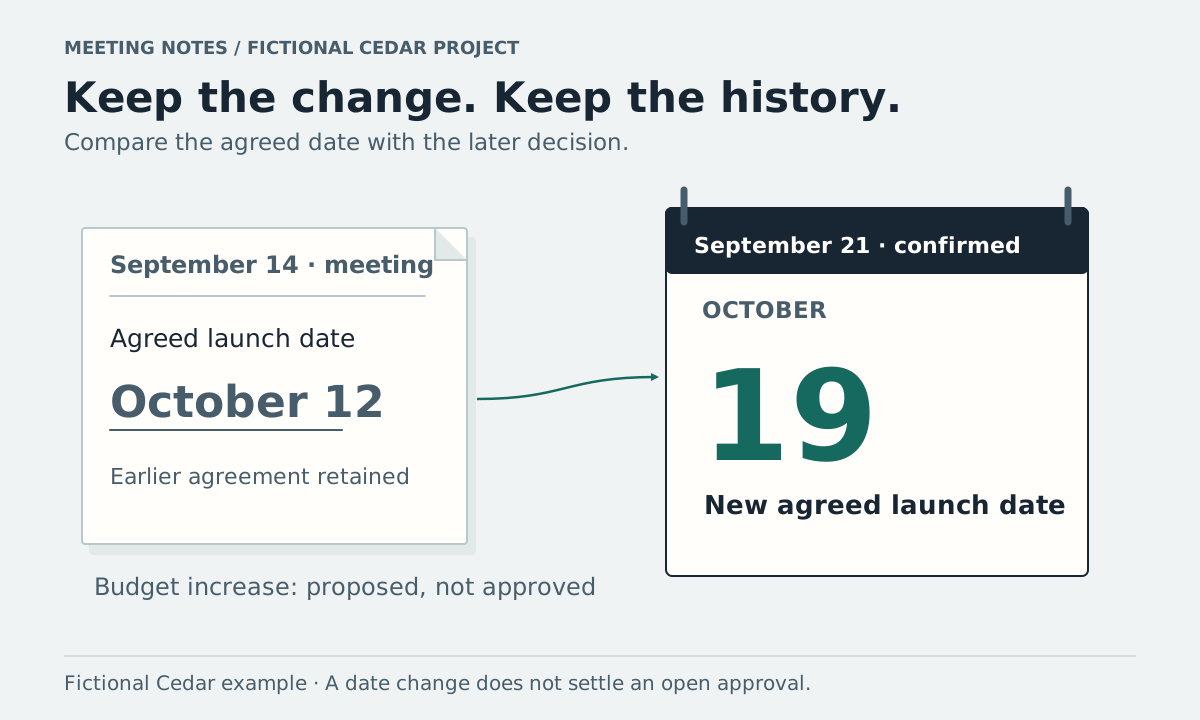
Put the earlier and later meeting notes side by side. Pick one detail, such as a launch date, and find what each note actually says about it. Record the old value, the new value, and whether the later discussion confirmed a change.
You can use the comparison sheet below in any document or spreadsheet. The worked example includes a confirmed date change, a budget proposal, and a task whose completion remains unknown.
Start with two dated notes and one question
Cedar is a fictional project. These short source notes are invented for this walkthrough. They are not a customer record or an example of an actual AI answer.
Cedar launch meeting, September 14, 2026
- “The team agreed to launch Cedar on October 12.”
- “Maya agreed to draft and send the launch checklist by September 24.”
- “We need someone to send launch invitations; no owner has been assigned.”
Cedar launch review, September 21, 2026
- “The team agreed to move Cedar's launch to October 19.”
- “An increase to the campaign budget was proposed. No budget decision was made.”
- “The checklist's completion was not confirmed.”
- “The owner for launch invitations is still unassigned.”
Start with: What changed about the launch date between these meetings? That is narrower than asking what changed about the entire project. Once you have checked the date, use the same process for tasks, budget, and other details.
Copy a comparison sheet
| Detail to check | Earlier note and passage | Later note and passage | What can you conclude? | What needs checking? |
|---|---|---|---|---|
Keep the source title, date, and a paragraph number or timestamp in each source column. A copied sentence should remain easy to find in the full note. If you have a recording, keep its location available for wording that needs closer review.
For Cedar, the filled sheet looks like this:
| Detail to check | Earlier note and passage | Later note and passage | What can you conclude? | What needs checking? |
|---|---|---|---|---|
| Launch date | September 14, item 1: agreed October 12 | September 21, item 1: agreed October 19 | A confirmed change to October 19 | The reason for the change is not recorded here |
| Campaign budget | No budget statement in the supplied note | September 21, item 2: increase proposed; no decision | A proposal remains open | Whether anyone approved it later |
| Launch checklist | September 14, item 2: Maya, due September 24 | September 21, item 3: completion not confirmed | The original commitment is recorded; completion is unknown | Ask Maya about progress |
| Launch invitations | September 14, item 3: no owner assigned | September 21, item 4: still unassigned | No recorded assignment between these meetings | Agree an owner |
The budget row cannot establish a changed budget: the earlier amount is absent and the later proposal is unapproved. A task missing from a later summary may still be open; omission alone cannot tell you that someone finished or cancelled it.
Check agreement before calling something a change
Read enough surrounding discussion to distinguish a suggestion from an agreement. “Could we move the launch?” leaves a question open. “The team agreed to move the launch” records a decision, subject to the accuracy of the notes themselves.
MIT's guidance for meeting note-takers recommends recording agreements separately and letting participants confirm their understanding. When the notes are ambiguous, ask the people responsible before changing the plan.
If one passage says October 12 and another says October 19 without explaining which was agreed, record both and mark the date as unresolved. A newer file is not enough to settle the question. It may be a draft, a suggestion, or a correction that still needs confirmation.
Compare the result with the project brief
Suppose Cedar also has a fictional launch brief dated September 14 with this sentence:
“Target launch: October 12.”
The confirmed September 21 meeting decision differs from that brief. Record that the brief needs review, and ask its owner to update it through the team's normal process. Keep the earlier brief and decision available so someone can understand why an old date still appears.
For a place to keep the current plan and dated history together, use the project notes template. Updating your working summary does not automatically update a brief, calendar, ticket, or agreement held elsewhere.
Ask across your notes, then open the supporting passages
In Vyxora Notes, you can ask about saved completed Notes. For a continuing project, Workstreams group related completed Notes and show possible changes beside earlier and newer passages. Review those passages before accepting a suggested change.
A useful question for the Cedar example is:
Compare the launch date in the September 14 and September 21 Cedar notes. What was confirmed, and what remains unknown? Show the passages behind the answer.
If a relevant brief is missing from the saved material, the assistant cannot check it. Add a supported text document to a Note as a source before relying on an answer about it. The wording and completeness of generated answers can vary; inspect the notes when a date, commitment, or approval matters.
Finish with the update someone needs to make
The checked Cedar update is:
Launch date: October 19, replacing the October 12 decision. Confirmed in the September 21 launch review, item 1. The supplied notes do not give a reason. Budget increase remains unapproved. Checklist progress and the invitation owner need confirmation.
Before using your own comparison, check that each changed value has a source, each proposal remains labeled, and each missing answer has a person or discussion where you can resolve it. Use those open questions to prepare the next meeting.