
Meeting notes
How to Prepare for a Meeting Using Your Previous Notes
Build a short meeting brief from earlier notes with confirmed decisions, tasks to check, unresolved questions, and the passages behind each point.
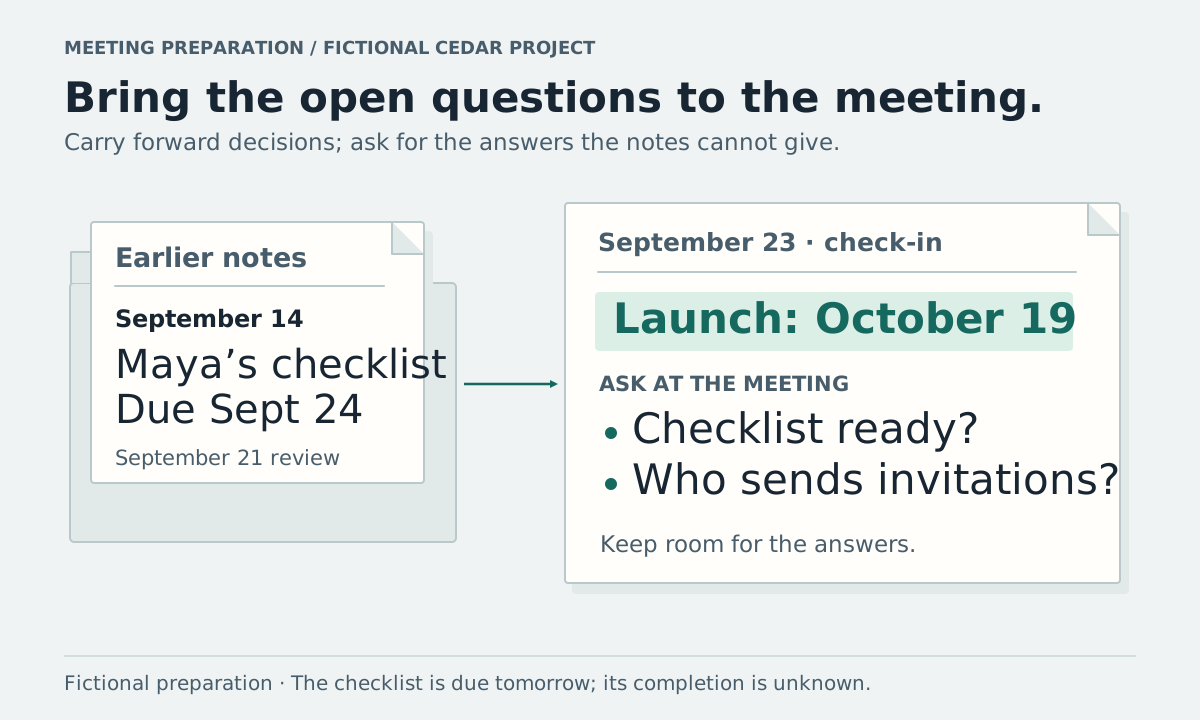
Open the last meeting's notes and the current project brief. Write down the decisions you can confirm, the tasks whose progress needs checking, and the questions people left unanswered. Use that short list to decide what the next meeting should accomplish.
The worksheet below turns two earlier notes into a meeting brief. You can do the same in a document without using a note-taking app.
Decide what this meeting needs to settle
Choose a specific purpose before rereading the whole archive. For example, “Agree who will send the launch invitations” gives you a reason to look for ownership and timing. “Discuss the project” leaves the preparation much broader.
MIT's meeting agenda guidance recommends setting a desired outcome for each agenda item and involving people who can address it. Once your notes reveal an unresolved question, check who needs to answer it and whether a meeting is the appropriate place.
Copy a preparation worksheet
Meeting:
Desired outcome:
Notes and current documents reviewed:

Confirmed decisions to carry forward:
- Decision / date / source passage

Actions to check:
- Action / owner / agreed deadline / last known status / source

Questions to settle:
- Question / who needs to answer / useful background

Documents that may need updating:
- Document / detail to check / relevant later source
Use “unknown” where the source cannot answer a question. Keep a note link, paragraph number, or recording timestamp next to each factual point so you can check it during the discussion.
Work through the earlier Cedar notes
Cedar is a fictional project. The source notes and preparation sheet below are invented for a September 23, 2026 check-in. They are not customer material or an actual assistant output.
The September 14 launch meeting recorded:
- “The team agreed to launch Cedar on October 12.”
- “Maya agreed to draft and send the launch checklist by September 24.”
- “We need someone to send launch invitations; no owner has been assigned.”
The September 21 launch review recorded:
- “The team agreed to move Cedar's launch to October 19.”
- “An increase to the campaign budget was proposed. No budget decision was made.”
- “The checklist's completion was not confirmed.”
- “The owner for launch invitations is still unassigned.”
The fictional launch brief dated September 14 still says “Target launch: October 12.” You have a confirmed later meeting decision and an earlier document to review. The meeting-notes comparison method explains how to preserve both records.
Fill the brief before making an agenda
For the fictional September 23 check-in, the preparation sheet reads:
| Part of the brief | Checked information | Source or next question |
|---|---|---|
| Current launch decision | October 19, replacing October 12 | September 21, item 1; September 14, item 1 |
| Checklist commitment | Maya agreed to draft and send it by September 24 | September 14, item 2 |
| Checklist progress | Completion not confirmed in the supplied notes | Ask Maya for an update |
| Budget | Increase proposed; no approval recorded | Ask who can make the budget decision |
| Invitations | Owner still unassigned | Agree who will send them and when |
| Brief to review | September 14 brief still lists October 12 | Ask the document owner to update the agreed date |
Do not use the newest note as the answer to every question. It changes the launch date, but it does not establish a new checklist deadline. Maya's original September 24 commitment remains the recorded deadline until another agreement changes it.
At this fictional September 23 check-in, that deadline is tomorrow. Ask whether the checklist is drafted and sent or whether a revised date needs agreement. Avoid labeling the task late based on an old note read much later.
Turn unanswered points into agenda items
For Cedar, a short agenda might include:
| Topic | Desired outcome | Person or information needed |
|---|---|---|
| Launch checklist | Confirm progress and any agreed change to the deadline | Maya and the checklist draft |
| Launch invitations | Agree an owner and deadline | Someone who can accept the work |
| Campaign budget | Confirm whether a decision can be made or what is needed first | The person authorized to approve the budget |
| Launch brief | Confirm how the October 19 decision will be reflected in the brief | The document owner |
These are proposed agenda items, not new assignments. If you do not know who can approve the budget, find that out before inviting someone as the approver. A person's name appearing in the notes does not establish their authority.
If only one progress update is needed, you may be able to ask that person directly instead of scheduling a meeting. For unresolved decisions affecting several people, share the question and relevant background in advance.
Use saved Notes to assemble the brief
In Vyxora, you can ask across completed saved Notes. A Workstream groups related Notes for a continuing project and lets you check the Notes behind an answer. Ask for the preparation you need:
Using these Cedar notes, help me prepare for a September 23 check-in. What decisions are confirmed, which recorded tasks need a progress update, and what questions remain open? Keep missing owners and approvals explicit and show the supporting passages.
Review the reply against the Notes. If the current brief is not included, add it as a supported text source to a Note before asking about its contents. Keep your proposed agenda separate from what the earlier meetings established.
Keep calendar invitations, attendee choices, and reminders in the tools you normally use for those jobs.
Leave space for the answers you get
Keep an empty outcome column beside the agenda. During the meeting, record each agreement, the person who accepted an action, and any agreed deadline. MIT's note-taking guidance also recommends keeping decisions and actions separate so participants can check the record.
Afterward, update your task list and add the new dated note to the project history. Keep unresolved questions open for the next discussion instead of filling them in from memory.