
Meeting notes
How to Turn Meeting Notes Into a Task List
Extract agreed actions from meeting notes, check owners and due dates, and use a filled example to separate real commitments from proposals and missing details.
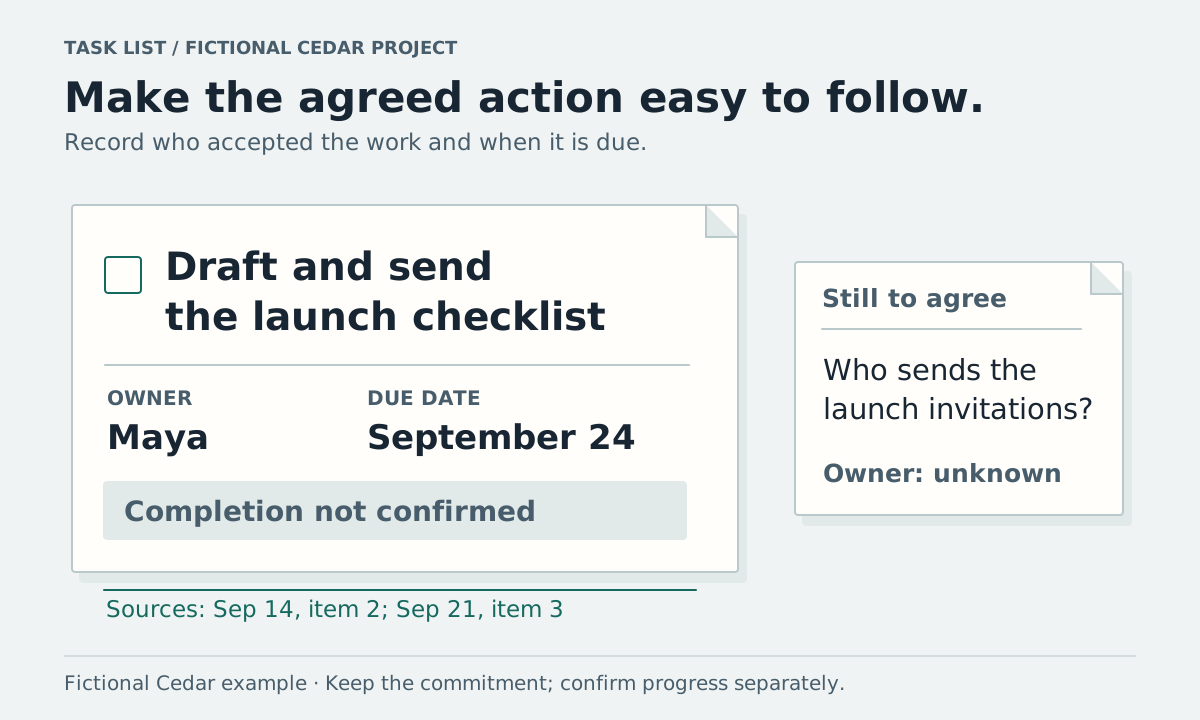
Find the things people agreed to do. For each one, record the action, the person who accepted it, any agreed deadline, and the passage where the commitment appears. Keep requests with missing owners or dates on a separate list to confirm.
You can copy the table below into a document or your usual task tool. The Cedar example shows why a changed plan, a suggested expense, and an assigned action need different treatment.
Read the commitments in the example
Cedar is fictional. These invented source notes and task tables are practice material, not customer data or actual generated results. The task review takes place on September 21, 2026.
The September 14 launch meeting contains:
- “The team agreed to launch Cedar on October 12.”
- “Maya agreed to draft and send the launch checklist by September 24.”
- “We need someone to send launch invitations; no owner has been assigned.”
The September 21 launch review contains:
- “The team agreed to move Cedar's launch to October 19.”
- “An increase to the campaign budget was proposed. No budget decision was made.”
- “The checklist's completion was not confirmed.”
- “The owner for launch invitations is still unassigned.”
Maya's checklist is an agreed action. The October 19 date is a decision about the plan. The budget increase is a proposal. Sending invitations needs an owner before you can treat it as someone's commitment.
MIT's guidance for recording meeting notes describes action items as work people agreed to complete and recommends recording the action, responsible person, and deadline. Start with those details, then add a source and status for later review.
Copy the task table
| Action | Agreed owner | Agreed due date | Current status | Source to check |
|---|---|---|---|---|
Give the action a verb and an observable result. “Draft and send the launch checklist” says what Maya agreed to do. “Launch checklist” alone could describe a document, an agenda topic, or a finished task.
The filled Cedar row is:
| Action | Agreed owner | Agreed due date | Current status | Source to check |
|---|---|---|---|---|
| Draft and send the launch checklist | Maya | September 24, 2026 | Completion not confirmed | September 14, item 2; September 21, item 3 |
If a task was agreed without a deadline, write “date to confirm.” If your tool requires a date, confirm it before saving a guessed deadline as though the meeting established it. Keep a proposed scheduling date labeled as your proposal until the responsible person agrees.
Keep questions out of the assigned list
Use a second table for items that need clarification:
| Item needing a decision | What the notes establish | Question to resolve |
|---|---|---|
| Launch invitations | Work is needed; no owner assigned | Who will send them, and by when? |
| Campaign budget | An increase was proposed; none approved | Should the budget change, and who can approve it? |
You may decide to add “Confirm the invitation owner” as a new task for yourself. Record that it was added after the meeting. The source note establishes the gap, while your later choice establishes your new commitment.
The date change may also lead to new work, such as updating a calendar. Check who agreed to that work before assigning it to someone else. An action you think would help is still a recommendation until someone takes responsibility.
Review generated action items against the notes
If an app extracts tasks, read the supporting passage for each proposed row. Check the verb, owner, deadline, and any condition. “Maya can help” is weaker than “Maya agreed to draft.” A task may depend on approval, access, or another person's work; keep a recorded condition attached to it.
Vyxora's Meeting mode organizes decisions and action items from your material. Its web task controls let you add and edit actions, mark them complete, and reopen them. Review extracted tasks before relying on them; generated notes and speaker details can contain mistakes.
For related Notes in a Workstream, the task list retains supporting Note references. Tasks you add yourself are labeled separately. Marking a Note task done and marking a Workstream task done are separate actions. Choose the list you intend to maintain and check that list when reviewing progress.
Asking chat to suggest tasks also needs a review step: add the tasks you accept through the task controls. A suggested task in an answer is not automatically a saved checklist item.
Check completion at the next review
Before the next meeting, ask for progress on the agreed actions. Without a progress update, keep the task open. When someone confirms it is finished, record the outcome and update its status. If the deadline changes, keep a note of the revised agreement.
For Cedar, the next review question is “Maya, is the launch checklist drafted and sent?” The September 21 note cannot answer it. The meeting preparation worksheet gives that question a place on the next agenda.
For a longer-running project, the project notes template keeps task rows beside decisions and dated updates. Use your organization's required task or approval system when this lightweight list is insufficient.